


By Shae Inglis
Posted in
July 15, 2026
(P4-06) What does a manufacturer's B2B customer portal need to include
Portal Scope
What a manufacturer's B2B customer portal needs to include
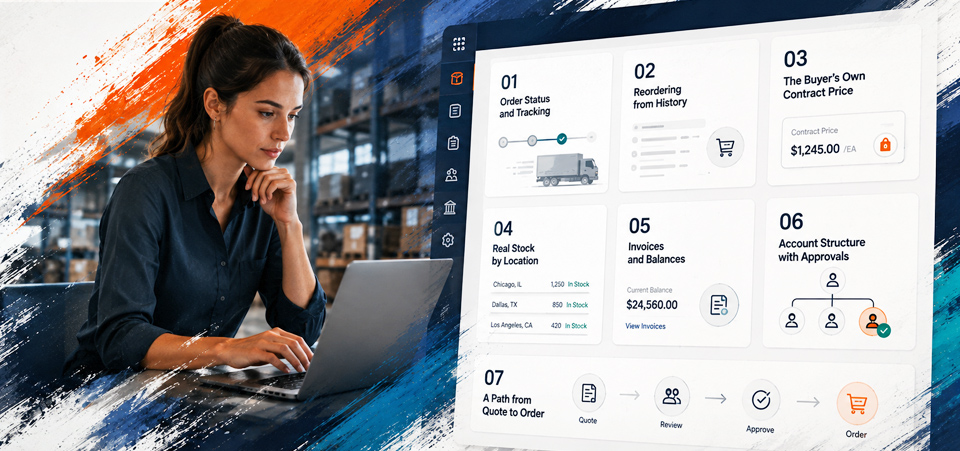
A manufacturer portal needs seven things: order status and tracking, reordering from history, the buyer's own contract price, real stock by location, invoices and balances, account structure with approvals, and a path from quote to order. What matters as much as the list is the order you build it in, because two of those are far cheaper than the rest.
Key takeaway
Build in the order the data is ready. Order status and reordering come almost free from a clean ERP. Contract pricing and quoting are where the real work is, so don't lead with them.
Capability lists for B2B portals tend to be long, undifferentiated, and unhelpful for planning, because they don't say what to do first. The useful version separates what buyers value most from what costs most to deliver. Those two things are not the same, and where they diverge is where roadmaps go wrong.
Below is the working list, ordered by what earns adoption soonest for the least effort. Each one is a capability your ERP probably already has an answer for. The portal's job is to render that answer accurately.
Order status and tracking
Start here. It's the capability customers rank highest, ahead of catalogue browsing, in Distribution Strategy Group's research on what customers want. It's also usually the cheapest to ship, because order and shipment records are already structured in the ERP and don't need reconciling against anything.
Do it properly and it removes a whole category of inbound calls. Show the order, the confirmed ship date, the tracking reference, and partial shipments, which is where naive integrations fall over because they assume one order equals one delivery.
Reordering from purchase history
In a repeat-purchase relationship most orders aren't discovery, they're repetition. McKinsey found only 15% of buyers want to talk to a salesperson when repurchasing an identical product. Purchase history, saved lists, and a two-click repeat cover an enormous share of order volume with very little product content work.
Bulk entry by part number belongs here too. Buyers who know their SKUs want a box to paste them into, not a catalogue to browse. It's unglamorous and heavily used.
The buyer's own contract price
This is where portals earn trust or lose it. A buyer who sees a list price with a note to call for terms has learned the portal isn't for them. Pricing has to render per account, honouring contract prices, price classes, volume breaks, and effective dates.
It's also the first genuinely hard capability, because pricing logic is usually the most customized part of an ERP and sometimes lives partly outside it. If contract prices are maintained in spreadsheets, that's the project before the portal project. The rule that holds is that the storefront should render the price, never calculate it, so the cart, the order, and the invoice can't disagree.
Real stock by location
Buyers want availability they can act on, and their top frustration in Sana Commerce's 2025 research was a lack of transparency around stock and delivery dates. Approximate availability is worse than none, because a customer who orders against a number that isn't real experiences it as a broken promise rather than a stale cache.
The honest version means availability by warehouse or location, read live where the architecture allows it, with a clear rule for what you'll commit to. Manufacturers with several locations should expect this to require real thought about which stock is promisable to whom.
Invoices, balances, and payments
Accounts payable are portal users too, and they generate a surprising share of the calls your customer service team fields. Give them open invoices, balances, due dates, payment history, and downloadable copies. Payment against invoice matters where terms are the norm, and it shortens days-to-pay for reasons that have nothing to do with the buying experience.
Account structure and approvals
B2B buying is rarely one person with a card. A dealer group has a parent company, several ship-to locations, buyers with different permissions, and someone who has to approve above a threshold. If the portal can't model that, buyers work around it and you lose the audit trail.
This is the capability where packaged platforms differ most, so check it against vendor documentation before committing. Adobe Commerce is the strongest of the mainstream options on parent and child company hierarchy with purchase-order approval rules, though its B2B capability is a separate extension. Others model two levels or none. Forrester's 2026 research found a typical buying decision now involves 13 internal stakeholders, which is the reason this matters.
Quote to order
Last, because it's the hardest and the least urgent. Where products are configured or priced by negotiation, buyers want to request a quote, see it, and turn it into an order without re-entering anything. Where products are configured to order, the portal has to validate the configuration rather than just capture text, which is a genuine build rather than a setting.
The prize is real. In 2025 research covering 200 manufacturers, wholesalers, and distributors, 88% reported losing deals because of how quotes were generated and approved, with complex approvals the leading cause and only 37% having fully automated quoting. Just don't put it in release one.
A note on the words
Three terms come up constantly in portal projects and get used loosely, so it's worth being plain about them. Configure-price-quote means software that walks a buyer through valid product options, prices the result, and produces a quote. Available-to-promise means the stock you can actually commit to a customer after existing allocations. Punchout means a buyer's own procurement system opening a session on your site, so their purchasing rules stay in force while they shop your catalogue. If a vendor uses one of these to mean something else, ask which.
Build in the order the data is ready
The sequence above isn't arbitrary. Order status and reordering come close to free from a clean ERP. Pricing, availability, and quoting need decisions about where truth lives and who owns it. Building the cheap, high-value capabilities first gets the portal used, which funds the harder work with something better than a business case.
APQC's benchmarks put the median cost of a digitally received sales order at $4.00 against $8.48 for the all-channel median, so every routine order that moves is a real saving. Pre-built versus custom covers the platform decision, and the rollout piece covers launching without the sales team pushing back.
Related Articles
Manufacturer digital self-service: the complete guide to B2B buyer portals
- What B2B buyers actually want online: the manufacturer self-service report
- Pre-built B2B portal vs custom portal: how manufacturers should choose
- How to roll out customer self-service without disrupting sales reps
- What does a manufacturer's B2B customer portal need to include
- Acumatica spotlight: a mid-market manufacturer dealer portal built on Acumatica
- Acumatica spotlight: distributor self-service at scale
Frequently Asked Questions
Seven capabilities: order status and tracking, reordering from purchase history, the buyer's own contract price, real stock by location, invoices and balances, account structure with approval thresholds, and a path from quote to order. Build them roughly in that order, because order status and reordering are far cheaper to deliver than pricing and quoting.
Order status and tracking, then reordering from history. Distribution Strategy Group's research ranks viewing order status and tracking shipments as the capability customers value most, ahead of catalogue browsing, and both draw on ERP data that is already structured. They earn adoption quickly and cost the least.
The storefront should render the price, never calculate it. Pricing logic stays in the ERP, honouring contract prices, price classes, volume breaks, and effective dates, so the price in the cart, on the order, and on the invoice always agree. If contract prices currently live in spreadsheets, fixing that is the project before the portal project.
It needs availability a customer can act on, which usually means stock by warehouse or location with a clear rule about what you'll commit to ship. Sana Commerce found buyers' top frustration is a lack of transparency around stock and delivery dates, and approximate availability is worse than none because customers order against it and experience the gap as a broken promise.
Because B2B buying is rarely one person. A dealer group has a parent company, multiple ship-to locations, buyers with different permissions, and approval thresholds. Forrester's 2026 research found a typical buying decision involves 13 internal stakeholders. If the portal can't model that structure, buyers work around it and you lose both the controls and the audit trail.
Usually not. Quote-to-order is the hardest capability, especially where products are configured and the portal has to validate a configuration rather than capture text. The payoff is real, since 88% of manufacturers in 2025 research reported losing deals over how quotes were generated and approved, but it's the wrong place to start when order status and reordering are cheaper and more immediately used.
Configure-price-quote is software that walks a buyer through valid product options, prices the result, and produces a quote. Available-to-promise is the stock you can genuinely commit after existing allocations. Punchout is a buyer's procurement system opening a session on your site so their purchasing rules stay in force while they shop your catalogue.
Next Step
Get the foundation right before you build.
For readers scoping a platform decision or wanting a full architecture recommendation.