




By Ben McLoughlin
Posted in
November 30, 2023
Maximizing ChatGPT for Software Development: A Practical Guide | Article
Maximizing ChatGPT for Software Development: A Practical Guide
Ben McLoughlin, Full Stack Developer, uncovers how ChatGPT is reshaping the terrain of software development. Step into a world where AI doesn't just assist but elevates your coding prowess, transforming intricate problems into streamlined success stories.
Introduction
Developers must be proficient with artificial intelligence (AI) tools if their aim is to remain relevant. ChatGPT can significantly enhance productivity, but it can waste time if it isn’t used correctly. This article shares essential tips on leveraging ChatGPT effectively, specifically tailored for developers.
1. Setting Up a Detailed User Profile
Begin by customizing your ChatGPT user profile. Detail your specific technology stack and the types of problems you commonly encounter. This personalization helps ChatGPT tailor its responses to your environment, leading to more relevant and practical solutions. My profile outlines my experience as a developer, along with the tools I primarily use. I also go over the broad tasks I’m working on at my company, such as creating a new checkout flow for mobile phones so that ChatGPT always knows the background of where my questions are coming from.
2. Organizing Questions in a Markdown File
I always accidentally press enter and submit my question halfway through. So now, I write my questions in a markdown file so that I can edit and articulate complex queries more clearly.
This approach allows you to structure your thoughts and questions coherently, ensuring that you cover all aspects of your query. You can also lay out your code blocks using three backticks to help it differentiate between your commentary and the code.
When sharing code, clarity is key. Use code blocks for better readability and specify file paths to provide context. This practice helps ChatGPT understand your code’s structure and purpose, enabling it to offer more targeted advice.
3. Using Custom Scripts for Large Code Submissions
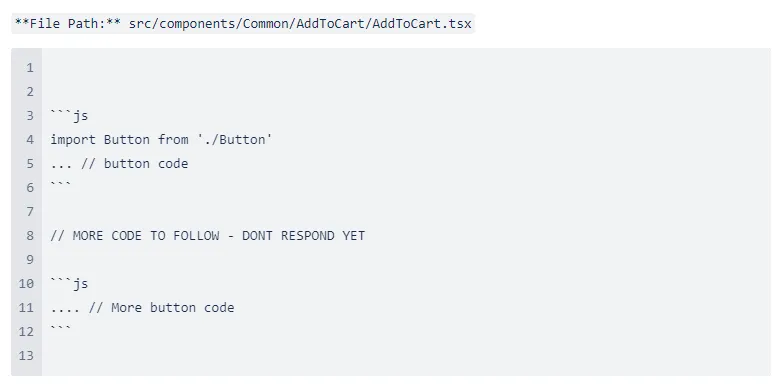
For lengthy code submissions, a custom script can be useful. It can break your code into smaller sections and signal ChatGPT when to respond. This method ensures that your entire code is reviewed without overwhelming the system. I had ChatGPT help me write a script, which I keep in the .vscode folder of each of my projects so that it is hidden behind our .gitignore and won’t impact other developers.
I run it like this:
It loops through each of the files in that folder and generates a markdown structure of the code with the file path above it. If the code is over 200 lines, it will put a pause marker telling ChatGPT that there’s more code to follow and not to respond yet.
4. Recognizing ChatGPT's Strengths and Limitations
ChatGPT excels in areas like writing tests and debugging code snippets. However, it may struggle with maintaining context in extensive codebases. Frame your questions to align with these strengths and limitations for the best results.
5. Managing Conversations and Queries
Efficient conversation management is crucial. Name your conversations and threads clearly for easy tracking. This combined approach of organizing and naming helps you to revisit past discussions and maintain a streamlined flow of information. Periodically clean your conversation history to keep the focus on relevant topics. I like to keep a conversation called “General Dev” for all my little developer questions, so I don’t clutter up my history and make it harder to find past ones.
6. Exercising Caution with Recommendations
While ChatGPT can be remarkably accurate, it's not infallible. Always review its recommendations, especially before implementing them directly into your code. Cross-reference with official documentation or other trusted resources when in doubt. One time, I asked it to do a simple millisecond calculation to tell me how many milliseconds were in a week, and it was completely wrong. I copied and pasted it into my project and wasted serious time trying to figure out why the time was incorrectly set.
Additional Tips
- Stay Informed: Keep abreast of the latest updates and capabilities of ChatGPT.
- Clarify Ambiguities: If an answer seems vague, don’t hesitate to ask follow-up questions or rephrase your query for clarity.
- External Validation: Cross-checking ChatGPT's suggestions with external documentation is always a good practice.
Conclusion
ChatGPT is a powerful tool in the arsenal of a modern software developer. Following these guidelines can enhance your productivity and make the most of this AI assistant. Remember, the key is to experiment and find the approach that works best for you.
Is AI integration part of your digital transformation plan?
If so, or if you want to know more about integrations and automation, contact us using the form below.
