



By Franco Shum
Posted in
,
September 25, 2025
1 Billion Tokens on Claude Code - Agentic AI Workflows | Article
ARTIFICIAL INTELLIGENCE
I Spent 1 Billion Tokens on Claude Code
Exploring how agentic workflows can be applied to day-to-day work.
Unlock the power of AI in your daily work by exploring how agentic workflows with Claude Code can revolutionize your development practices. Discover practical strategies for context engineering and supervised workflows that enhance efficiency and accuracy.
The first time I tried using agentic programming was with Cursor. It was impressive how the agent could fill in code and often resolve problems in ways I wouldn’t have thought of. Those experiences were mostly with small, specific tasks, but when it came to more complex problems, Cursor often generated nonsense code that ended up costing more time to fix. So I didn’t fully believe in it — maybe it was just marketing?
Then I started seeing many developers on social media sharing success stories about using Claude Code in their projects, and that caught my interest. Since then, I’ve grown to love it, and now I use it daily. Here are some of my experiences and how I put them into practice.
Context engineering
My experience with LLMs is that when asked to solve a complicated problem, or even a problem you don’t fully understand yourself, most of the time, they provide incorrect answers. This could be because the model doesn’t have enough training data or because the prompt you provided was unclear, which leads to inconsistent results.
I came across the term "context engineering" in an Andrej Karpathy tweet on Twitter/X, and that changed my understanding of how to get better results from LLMs.
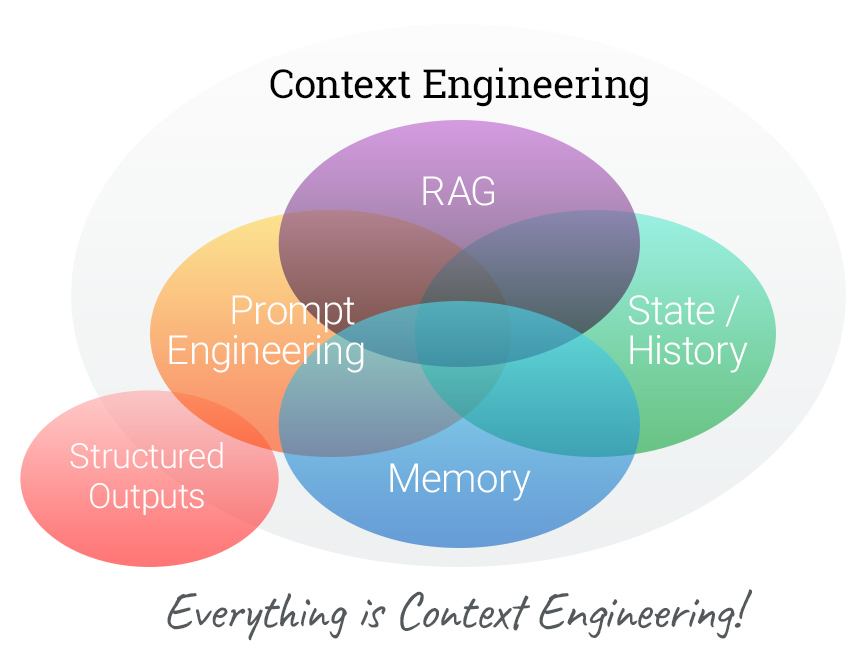
Here are the things you can do:
- Creating a CLAUDE.md memory file is a crucial step. It sets boundaries for the tool, defining what it should or shouldn’t do, and provides instructions to the agent.
- Enable an MCP server for Claude Code to access the latest data, for example, Context7 MCP or a UI library like Shadcn-UI MCP.
- Make good use of folder structures to let Claude Code access log files, research files, plan files, etc. A memory file helps the tool stay on track with what it should do and what has been done.
Sub-agent
Never use a sub-agent to write code. Never use a sub-agent to write code. Never use a sub-agent to write code!
Each sub-agent has its own context window, separate from the main conversation. If you pass a coding task to a sub-agent, it will cost a ton of tokens per task, and you won’t gain any benefit, because the sub-agent doesn’t have the full picture of the feature or the history from the primary agent. Instead, use sub-agents for research tasks, save the findings to a .md file, and let the primary agent handle the coding work.
More detail in the doc: Subagents - Claude Docs
Workflow
A full life-cycle workflow — higher risk
The workflow is very close to business setup, where we have devs, UAT, a software architect, and a code reviewer work together as a team. I created each sub-agent and added specific instructions into CLAUDE.md and sub agent file to chain together work as a team.
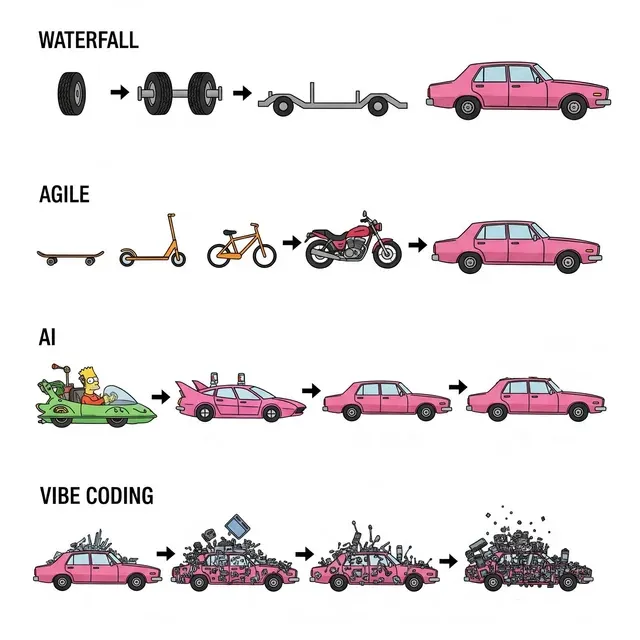
There are many layers to process and agent chains together; it looks very close to a day-to-day business setup, but I found that it is not useful. Given the layer of agent chains, if one agent goes wrong with a small thing, the whole workflow will blow up. And there is a chance that we were given a very ambiguous prompt in the first place. Then the whole result turns into a nightmare. I also experienced giving a clear task instruction, and an agent hard-coded a test case to get the requirement done. A very complicated architecture is being added to a simple feature, and a lot of useless logic is being added. You end up having the feature out of the target of the requirement, then you need to go back and fix it.I suspect a complicated workflow could lead the agent to ‘try to get it done’ instead of ‘get the request correct.’ It’s also possible that with context history, the agent forgets what the primary goal is.
Supervised workflow — lower risk
Given that there is a chance AI could go wrong, you need to leave some room for intervention before the problem gets bigger. Instead of letting the agent code everything for you, you should tell the agent how the code should be written. Break down the task into small pieces, let the tool build it, then examine it yourself before going to the next task. If things break, create a new request and let the tool help fix it for you. As a developer, your task is to oversee how the agent performs and give direct guidance to the AI.

- A practical example
I already put the workflow into Gesso. I personally don’t have much experience in ESM/TypeScript config — the only experience I have is with Rollup config in a small project. And yet, 99% of the changes were made by Claude Code, and most of my time I was doing context engineering and prompt engineering to fine-tune the workflow so it was workable. It turned out it fixed most of the issues I found, and the success rate was good. I would say I wouldn’t even have been able to make so many changes in such a short period of time.
Example prompt:
|
Final Thought
Claude Code unlocks the power if you provide the right context and prompt. However, the sub-agents' workflow is can be costly. There is a barrier to entry, but I would love to see what the tool could bring to my work and personal projects.
There are still unknowns about how to properly get the workflow done. I have been researching, but most of the findings are from the developer community, not from the docs. Even when I looked at the official blog post related to practical use: How Anthropic teams use Claude Code, there are no official examples on how to set up or recommended setups. So my understanding might be wrong, or maybe this setup works for me but not for other tasks. I would love to test it on other Gesso tasks, and I will come back to this and add more findings.
How Acro Commerce uses AI
Artificial Intelligence has serious potential to bring order and efficiency to your B2B business. But also chaos and disruption.
We help manufacturers and B2B merchants prepare their operations first, so when you enable AI, it amplifies what works instead of breaking what doesn’t.